Windows Edge瀏覽器卡頓的一種解決辦法
Categories:
瀏覽器版本
122.0.2365.80+
卡頓現象
- 開啟個人 profile 時卡頓
- 開啟和搜尋儲存密碼時卡頓
- 新增和關閉 tab 時卡頓
- 在新增的 tab 中輸入字元時卡頓
目前發現僅中文版 Windows 系統會出現此類型的卡頓。
解決辦法
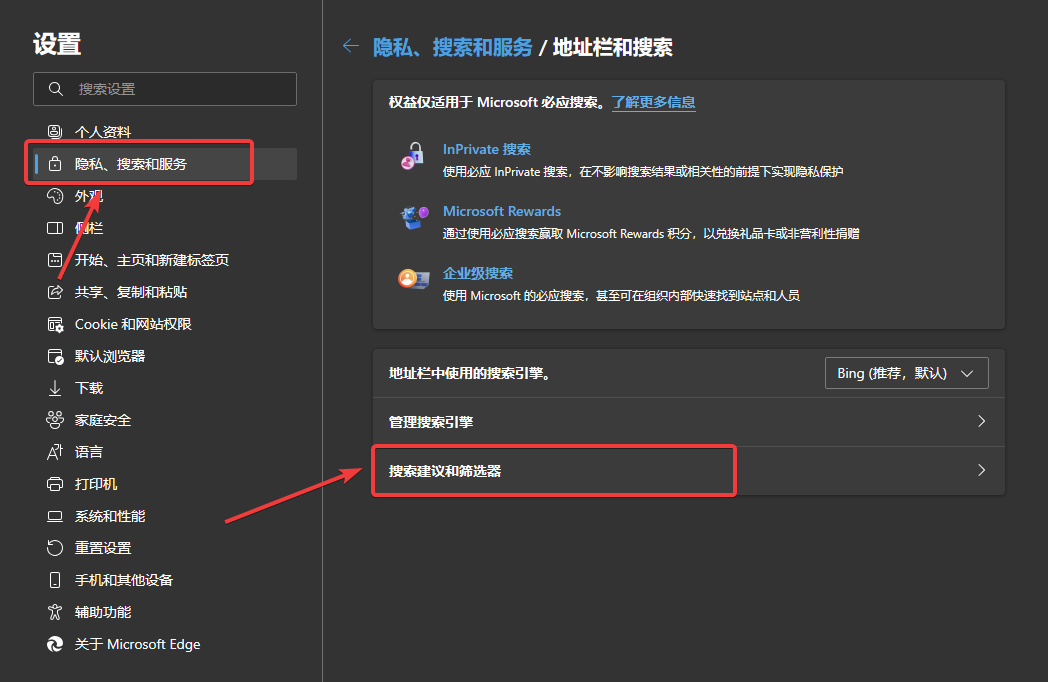
中文瀏覽器設定路徑:隱私-搜尋-服務 -> 地址列和搜尋 -> 搜尋建議和篩選器 -> 搜尋篩選器,關閉搜尋篩選器。
英文瀏覽器設定路徑:Privacy search and services -> Address bar and search -> Search sugesstion and filters -> Search filters,TURN OFF Search filters。